
Native Antifraud
Fraud analysis & riskLeverage Adyen’s expertise in Fraud Analysis & Risk within the Adyen V3 connector.
The Connector can now use the results of Adyen's native antifraud analysis, integrating them directly into the standard payment flow. This removes the need for a second evaluation by a third-party antifraud solution.
When the Connector receives a favorable analysis from Adyen for a transaction, it sends the approval signal to the platform, allowing the payment flow to proceed without triggering a new antifraud check.

How to enable
For the connector to receive the Adyen risk analysis result, you must enable Fraud result (the risk result) in your Adyen Customer Area. It is not turned on by default.
- In your Adyen Customer Area, go to Developers > Additional data.
- In the Risk section, check Fraud result.
- Click Save configuration.
Important: Configure both Test and Production environments.
Enable in the VTEX provider
In the Adyen provider settings in VTEX, under Payment Control, check Trust the provider's anti-fraud analysis. This avoids a second analysis when Adyen has already approved the payment.
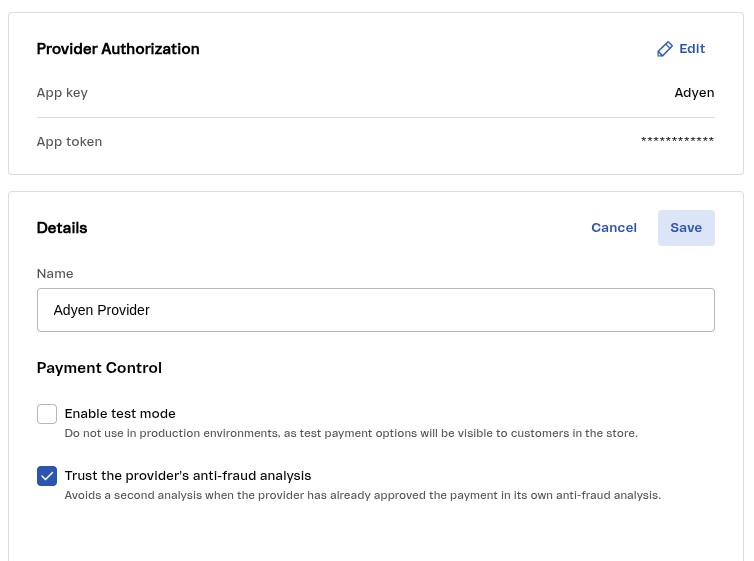
If the option is not available in the provider, install the latest version of the Payment Affiliations app (vtex.admin-payment-affiliations@1.11.0) or open a ticket with VTEX to request the update.
Was this page helpful?